See it in action
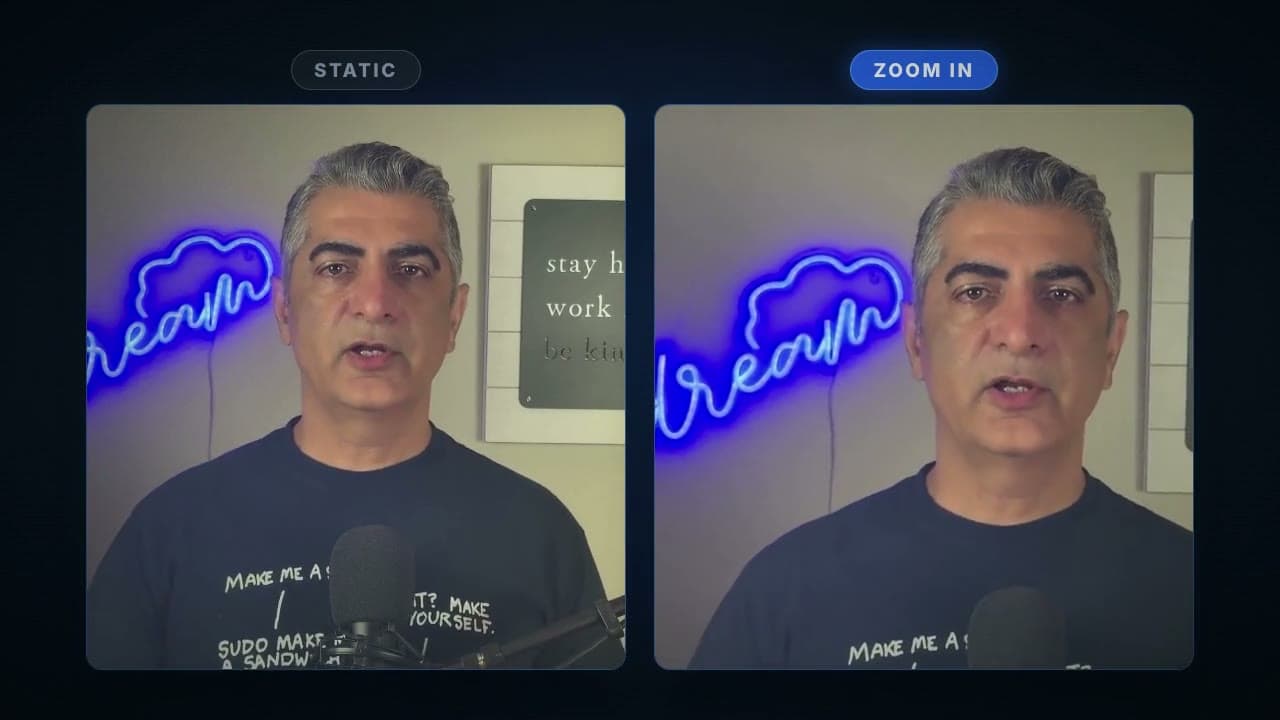
How it works
Upload your video
Any MP4, MOV, or WebM. Steady footage works best, since the move reads as a camera push.
The push-in is applied
The frame zooms toward the center across the whole clip, timed to your video length so the motion never rushes or stalls.
Download the finished clip
Same resolution, same audio, same length. The only change is the motion.
What this blueprint does
A locked-off shot is easy to film and hard to watch. The frame never moves, so nothing tells the viewer where to look or why to keep watching. Editors fix this with a slow push-in: the frame creeps toward the subject and the shot suddenly has intent. Doing it in an editor means keyframing scale and position by hand. This blueprint does the same move in one pass. Upload the clip, and the zoom ramps smoothly across its full length, ending about a quarter closer than it started.
What you get
Your clip with a smooth, full-length push-in toward the center of the frame, exported as a platform-ready MP4 with the original audio intact.
Who uses it
Talking-head creators
Make a webcam or tripod shot feel produced instead of parked.
Product marketers
Turn a static product tabletop shot into a slow reveal that draws the eye in.
Social media editors
Add motion to b-roll and photo-style clips without opening a timeline.
Frequently asked questions
How strong is the zoom?
The clip ends about 25 percent closer than it starts, spread evenly across the full length. It reads as a deliberate camera move rather than a digital effect.
Does it crop my video?
The push-in works by gradually magnifying the frame, so the edges leave the visible area as the zoom progresses. Keep important action away from the very edges of the frame.
Does my audio survive?
Yes. The audio track passes through untouched and stays in sync.
What does it cost?
Zoom In runs on your plan's included compute like any transcode. There's a free tier to start, no credit card required.
Try Zoom In on your own footage
Sign up free, open the blueprint, and run your first render in a couple of minutes.