See it in action
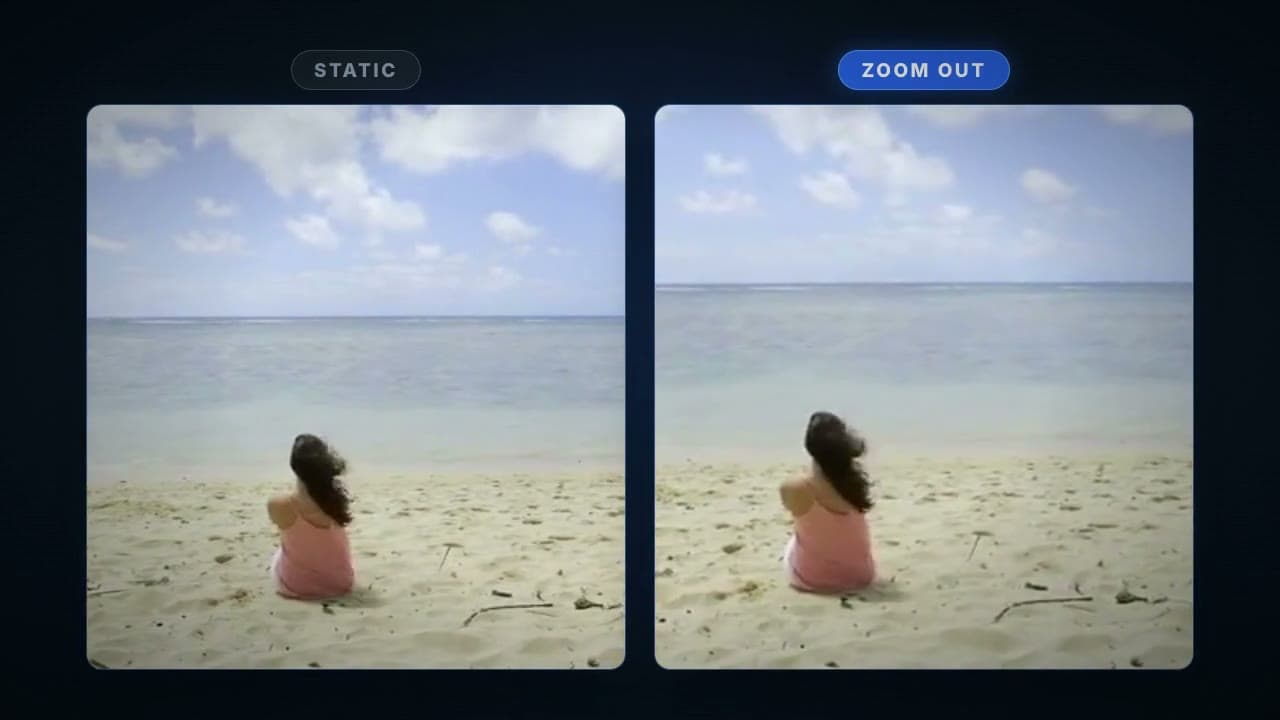
How it works
Upload your video
Any MP4, MOV, or WebM. The reveal lands best when the wide frame has something worth arriving at.
The pull-back is applied
The clip opens zoomed toward the center and glides back to the full frame, timed to your video length.
Download the finished clip
Same resolution, same audio, same length. Only the motion changes.
What this blueprint does
The pull-back reveal is one of the oldest moves in the book: open tight on a detail, then widen until the full scene explains itself. It works because it answers a question the viewer did not know they had. Building it in an editor means animating scale keyframes and re-exporting until the pacing feels right. This blueprint applies the move in one pass, starting about a quarter zoomed in on the center of your frame and easing out to the full shot across the entire clip.
What you get
Your clip with a smooth, full-length pull-back from a tight center crop to the complete frame, exported as a platform-ready MP4 with the original audio intact.
Who uses it
Storytelling creators
Open on the detail, land on the context. The reveal beat without the edit session.
Product marketers
Start on the label or logo and widen to the full product spread.
Real estate and travel marketers
Pull back from a feature to the full room or view for an effortless establishing shot.
Frequently asked questions
Where does the zoom start?
The clip opens about 25 percent zoomed in on the center of the frame and eases back to the full shot by the end. Compose so the interesting detail sits near the center.
Can I choose what it starts on?
The move is centered. If your subject is off to one side, crop or reframe the clip first, or pair it with the Resize for Format blueprint.
Does my audio survive?
Yes. The audio track passes through untouched and stays in sync.
What does it cost?
Zoom Out runs on your plan's included compute like any transcode. There's a free tier to start, no credit card required.
Try Zoom Out on your own footage
Sign up free, open the blueprint, and run your first render in a couple of minutes.